| Author |
Topic |
|
FabioEinaus
Starting Member
41 Posts |
 Posted - 2007-01-04 : 11:38:52 Posted - 2007-01-04 : 11:38:52
|
Hi Guys!I'm getting a little problem making my stored procedure..I'm making a stored procedure for copy all the records that I have on the Carrinho table to the DocumentosArtigos table.I have an image that discribes what I want: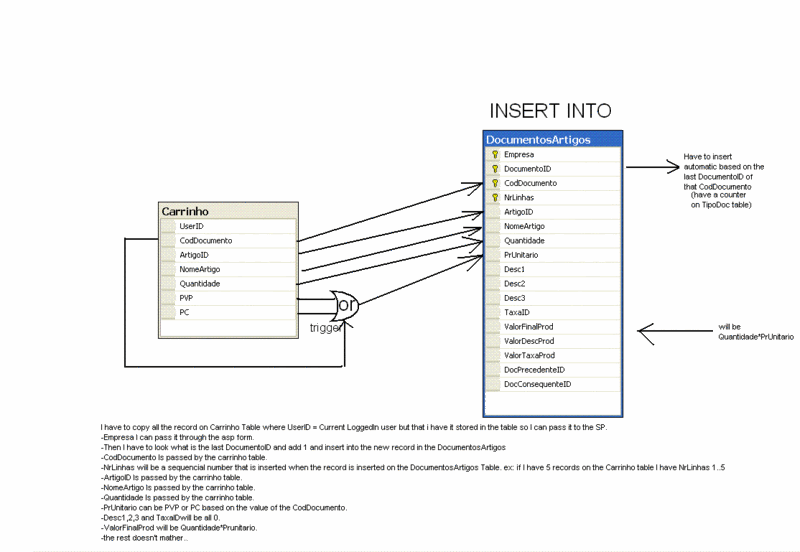 I just don't know where to start..can someone help me?A Happy 2007 to everyone!Thanks in advance for the replys I just don't know where to start..can someone help me?A Happy 2007 to everyone!Thanks in advance for the replys  |
|
|
FabioEinaus
Starting Member
41 Posts |
Posted - 2007-01-05 : 06:48:55
|
| I made some code since yesterday but I'm getting some errors and I even don't know if this will work:USE EINAUSSET ANSI_NULLS ONGOSET QUOTED_IDENTIFIER ONGOCREATE PROCEDURE e_TransformaCarrinho -- Add the parameters for the stored procedure here @UserID as CHAR(5) ASBEGIN -- SET NOCOUNT ON added to prevent extra result sets from -- interfering with SELECT statements. SET NOCOUNT ON; DECLARE @Temp AS INT DECLARE @I AS INT = '0' SELECT @Temp = (SELECT COUNT(ArtigoID) FROM Carrinho WHERE UserID = @User) IF (CodDocumento = '1') INSERT INTO DocumentosArtigos ('T','50',CodDocumentoID, @I, ArtigoID, NomeArtigo, Quantidade, PVP, '0','0','0','0,21',(Quantidade*PVP+(Quantidade*PVP*0,21)), '0', (Quantidade*PVP*0,21), '0','0') SELECT CodDocumento,ArtigoID,NomeArtigo,Quantidade,PVP FROM Carrinho WHERE UserID = @User IF (CodDocumento = '2') INSERT INTO DocumentosArtigos ('T','50',CodDocumentoID, @I, ArtigoID, NomeArtigo, Quantidade, PC, '0','0','0','0,21',(Quantidade*PC+(Quantidade*PC*0,21)), '0', (Quantidade*PC*0,21), '0','0') SELECT CodDocumento,ArtigoID,NomeArtigo,Quantidade,PC FROM Carrinho WHERE UserID = @User ENDGO------------------------------------The errors are:Msg 139, Level 15, State 1, Procedure e_TransformaCarrinho, Line 0Cannot assign a default value to a local variable.Msg 137, Level 15, State 2, Procedure e_TransformaCarrinho, Line 19Must declare the scalar variable "@User".Msg 102, Level 15, State 1, Procedure e_TransformaCarrinho, Line 22Incorrect syntax near 'CodDocumentoID'.Msg 137, Level 15, State 2, Procedure e_TransformaCarrinho, Line 25Must declare the scalar variable "@User".Msg 102, Level 15, State 1, Procedure e_TransformaCarrinho, Line 27Incorrect syntax near 'CodDocumentoID'.Msg 137, Level 15, State 2, Procedure e_TransformaCarrinho, Line 30Must declare the scalar variable "@User". |
 |
|
|
snSQL
Master Smack Fu Yak Hacker
1837 Posts |
Posted - 2007-01-05 : 12:31:59
|
This will fix your errors (the error messages tell you exactly what's wrong). I haven't looked too closely at the code to see what it's doing so I don't know if this will do everything you want, but it should be closer. You must not put quotes around numeric values.USE EINAUSSET ANSI_NULLS ONGOSET QUOTED_IDENTIFIER ONGOCREATE PROCEDURE e_TransformaCarrinho -- Add the parameters for the stored procedure here@UserID as CHAR(5) ASBEGIN -- SET NOCOUNT ON added to prevent extra result sets from -- interfering with SELECT statements. SET NOCOUNT ON; DECLARE @I INT SET @I = 0 INSERT DocumentosArtigos SELECT 'T', 50 ,CodDocumentoID, @I, ArtigoID, NomeArtigo, Quantidade, CASE WHEN CodDocumento = 1 THEN 'PVP' WHEN CodDocumento = 2 THEN 'PC' END, 0, 0, 0, 0.21, (Quantidade*PVP+(Quantidade*PVP*0.21)), 0, (Quantidade*PVP*0.21), 0, 0 FROM Carrinho WHERE UserID = @UserIDENDGO |
|
|
|
FabioEinaus
Starting Member
41 Posts |
Posted - 2007-01-08 : 04:03:28
|
| Thanks in advance for the reply.I'm getting the folowing error:Msg 515, Level 16, State 2, Procedure tgDocumentosArtigos_Insert, Line 28Cannot insert the value NULL into column 'PrUnitario', table 'EINAUS.dbo.DocumentosArtigos'; column does not allow nulls. INSERT fails.The statement has been terminated.I think the SP ig going to work I only don't know if @I will be sequencial.. is it? |
|
|
|
FabioEinaus
Starting Member
41 Posts |
Posted - 2007-01-08 : 10:00:41
|
| I solved this problem but know it don't inserts anything.. |
|
|
|
SwePeso
Patron Saint of Lost Yaks
30421 Posts |
Posted - 2007-01-08 : 10:11:16
|
snSQL, PVP and PC are columns, not text.CREATE PROCEDURE e_TransformaCarrinho ( @UserID as CHAR(5))ASSET NOCOUNT ONDECLARE @Temp AS INT, @I AS INTSELECT @Temp = COUNT(ArtigoID), @I = 0FROM CarrinhoWHERE UserID = @UserINSERT DocumentosArtigosSELECT 'T', '50', CodDocumentoID, @I, ArtigoID, NomeArtigo, Quantidade, CASE WHEN CodDocumento = 1 THEN PVP WHEN CodDocumento = 2 THEN PC ELSE NULL END 0, 0, 0, 0, 21, Quantidade * PC * 1.21, 0, Quantidade * PC * 0.21, 0, 0FROM CarrinhoWHERE UserID = @User FabioEinaus, the most obvious reason for this code not to work, is that you use a USERID that does not exist.Peter LarssonHelsingborg, Sweden |
|
|
|
FabioEinaus
Starting Member
41 Posts |
Posted - 2007-01-08 : 10:28:34
|
| But i'm testing by passing the User by parameter:USE [EINAUS]GO/****** Object: StoredProcedure [dbo].[e_TransformaCarrinho] Script Date: 01/08/2007 09:01:22 ******/SET ANSI_NULLS ONGOSET QUOTED_IDENTIFIER ONGOALTER PROCEDURE [dbo].[e_TransformaCarrinho] -- Add the parameters for the stored procedure here@User as CHAR(5),@CodDoc as CHAR(5) ASBEGIN -- SET NOCOUNT ON added to prevent extra result sets from -- interfering with SELECT statements. SET NOCOUNT ON;DECLARE @Temp AS INT, @I AS INTSELECT @Temp = COUNT(ArtigoID), @I = 0FROM CarrinhoWHERE UserID = @UserINSERT DocumentosArtigosSELECT 'T', '50', @CodDoc, @I, ArtigoID, NomeArtigo, Quantidade, CASE WHEN @CodDoc = 1 THEN PVP WHEN @CodDoc = 2 THEN PC ELSE NULL END, 0, 0, 0, 21, Quantidade * PC * 1.21, 0, Quantidade * PC * 0.21, 0, 0FROM CarrinhoWHERE UserID = @UserENDI'm calling the SP like this:Use Einausexec e_TransformaCarrinho '2','FAP 'I already checked that and I'm sure that I have record with FAP on the UserID field on the Carrinho table |
|
|
|
SwePeso
Patron Saint of Lost Yaks
30421 Posts |
Posted - 2007-01-08 : 10:34:05
|
| Change parameter datatype CHAR to VARCHAR.Peter LarssonHelsingborg, Sweden |
|
|
|
FabioEinaus
Starting Member
41 Posts |
Posted - 2007-01-08 : 10:42:21
|
| Nop still the same.. I just don't get it.. It seems to be wright.. |
|
|
|
SwePeso
Patron Saint of Lost Yaks
30421 Posts |
Posted - 2007-01-08 : 10:45:17
|
| Comment out the WHERE part and run the stored procedure again.Are records inserted now?Peter LarssonHelsingborg, Sweden |
|
|
|
FabioEinaus
Starting Member
41 Posts |
Posted - 2007-01-08 : 10:55:37
|
| Msg 245, Level 16, State 1, Procedure e_TransformaCarrinho, Line 19Conversion failed when converting the varchar value 'FAP' to data type int.Then I changed the way when I pass the parameters to Use Einausexec e_TransformaCarrinho 'FAP','2'Because I select first the UserID and then de CodDocAnd now it seems that he is getting the records but here it is the erros that i expected:Msg 2627, Level 14, State 1, Procedure tgDocumentosArtigos_Insert, Line 28Violation of PRIMARY KEY constraint 'PK_DocumentosArtigos_1'. Cannot insert duplicate key in object 'dbo.DocumentosArtigos'.The statement has been terminated.My PK consists in Empresa,CodDocumento,DocumentoID and NrLinhas (the first 4 values on the Insert on the SP)But I want to Insert a sequencial number on the @I variable.Thanks Peso |
|
|
|
SwePeso
Patron Saint of Lost Yaks
30421 Posts |
Posted - 2007-01-08 : 11:01:31
|
Are you telling is you didn't pass the parameters in the correct order?CREATE PROCEDURE dbo.e_TransformaCarrinho( @User as CHAR(5), @CodDoc as CHAR(5))ASSET NOCOUNT ONDECLARE @i AS INTSELECT @i = 1 + ISNULL(MAX(NrLinhas), 0)FROM CarrinhoINSERT DocumentosArtigosSELECT 'T', '50', @CodDoc, @I, ArtigoID, NomeArtigo, Quantidade, CASE WHEN @CodDoc = 1 THEN PVP WHEN @CodDoc = 2 THEN PC ELSE NULL END, 0, 0, 0, 21, Quantidade * PC * 1.21, 0, Quantidade * PC * 0.21, 0, 0FROM CarrinhoWHERE UserID = @User Peter LarssonHelsingborg, Sweden |
|
|
|
FabioEinaus
Starting Member
41 Posts |
Posted - 2007-01-08 : 11:16:40
|
| Yes because I define first the User and then the CodDoc, but now it's correct but the error is the same:Msg 2627, Level 14, State 1, Procedure tgDocumentosArtigos_Insert, Line 28Violation of PRIMARY KEY constraint 'PK_DocumentosArtigos_1'. Cannot insert duplicate key in object 'dbo.DocumentosArtigos'.The statement has been terminated.It seems that the @i is not doing his job |
|
|
|
FabioEinaus
Starting Member
41 Posts |
Posted - 2007-01-08 : 12:19:38
|
| My problem is that It have to be inserted one row at a time and it could be done by a while or something like that but how can I know the records that I've inserted before?Like the arrays I use to do like this:a=[0,0,0,0,0,0,0,0,0]i=0temp=5doa[i]i++while(i!=10)But in this case I know the index that i'm working.. how can I now this in SQLServer? |
|
|
|
SwePeso
Patron Saint of Lost Yaks
30421 Posts |
Posted - 2007-01-08 : 12:28:12
|
| Read my previous answer. Did that query work for you?Peter LarssonHelsingborg, Sweden |
|
|
|
SwePeso
Patron Saint of Lost Yaks
30421 Posts |
Posted - 2007-01-08 : 12:29:25
|
| [code]CREATE PROCEDURE dbo.e_TransformaCarrinho( @User as CHAR(5), @CodDoc as CHAR(5))ASSET NOCOUNT ONDECLARE @i AS INTSELECT @i = 1 + ISNULL(MAX(NrLinhas), 0)FROM CarrinhoINSERT DocumentosArtigosSELECT 'T', '50', @CodDoc, @I + NrLinHas, ArtigoID, NomeArtigo, Quantidade, CASE WHEN @CodDoc = 1 THEN PVP WHEN @CodDoc = 2 THEN PC ELSE NULL END, 0, 0, 0, 21, Quantidade * PC * 1.21, 0, Quantidade * PC * 0.21, 0, 0FROM CarrinhoWHERE UserID = @User[/code]Peter LarssonHelsingborg, Sweden |
|
|
|
FabioEinaus
Starting Member
41 Posts |
Posted - 2007-01-08 : 12:37:54
|
quote:
Originally posted by FabioEinaus
Yes because I define first the User and then the CodDoc, but now it's correct but the error is the same:Msg 2627, Level 14, State 1, Procedure tgDocumentosArtigos_Insert, Line 28Violation of PRIMARY KEY constraint 'PK_DocumentosArtigos_1'. Cannot insert duplicate key in object 'dbo.DocumentosArtigos'.The statement has been terminated.
Yes I even answered you.I had to change a little things on the code:ALTER PROCEDURE [dbo].[e_TransformaCarrinho] -- Add the parameters for the stored procedure here @User as VARCHAR(5), @CodDoc as VARCHAR(5) ASSET NOCOUNT ONDECLARE @i AS INTSELECT @i = 1 + ISNULL(MAX(NrLinhas), 0)FROM DocumentosArtigosINSERT DocumentosArtigosSELECT 'T', '50', @CodDoc, @I + D.NrLinhas, C.ArtigoID, C.NomeArtigo, C.Quantidade, CASE WHEN @CodDoc = 1 THEN C.PVP WHEN @CodDoc = 2 THEN C.PC ELSE NULL END, 0, 0, 0, 21, C.Quantidade * C.PC * 1.21, 0, C.Quantidade * C.PC * 0.21, 0, 0FROM Carrinho C, DocumentosArtigos DWHERE UserID = @UserIt doesn't return any error but is still don't insert any record.A tried to remove the where clause but it don't works.. |
|
|
|
SwePeso
Patron Saint of Lost Yaks
30421 Posts |
Posted - 2007-01-08 : 12:57:47
|
| Which error do you get now?Peter LarssonHelsingborg, Sweden |
|
|
|
FabioEinaus
Starting Member
41 Posts |
Posted - 2007-01-09 : 04:00:58
|
| None.. It simply don't insert records on the DocumentosArtigos table |
|
|
|
|
|
|



 Copy Records